Nothing runs until an owner opts in
AI-assisted features are a single switch held by owners and admins in Automation and Capacity Controls, and it starts off. Until it is on, none of the functions below exist anywhere in the workspace.

AI assistance is off until your organisation turns it on, and then you choose each function separately. Every result waits for a person, the original records are never changed, and the work is metered like any other automation.
Nothing AI-assisted runs until an owner or admin enables it for the organisation.
Turn on the one function you want and leave the rest off. They are not a bundle.
Assistance drafts and flags; it never decides, and it never edits the original record.
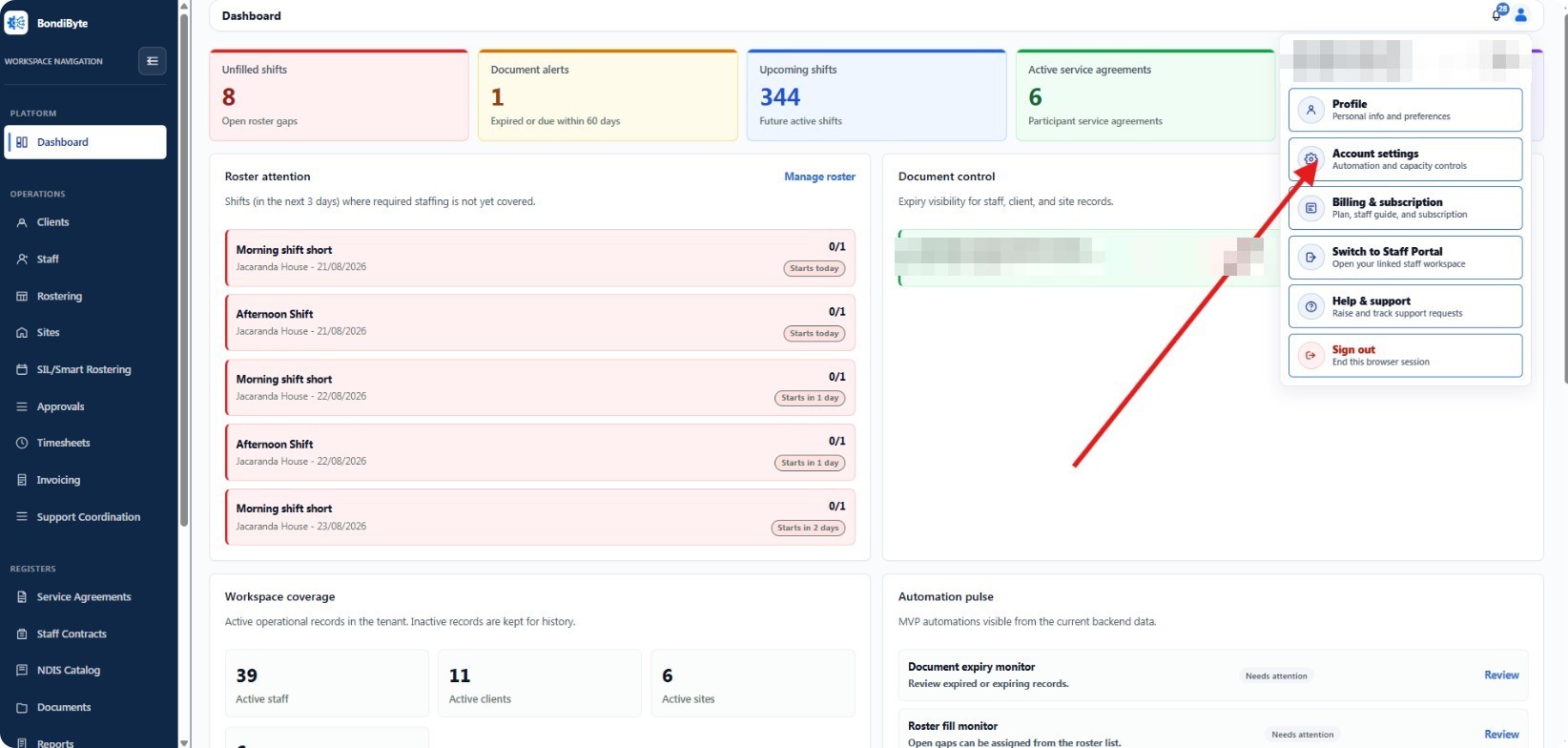
AI-assisted features is one owner-held switch here, and starts off.
Most providers are wary of AI in a care setting, and reasonably so. The questions are always the same: what gets sent, who sees it, what happens if it is wrong, and can we stop it. So BondiByte answers them structurally rather than in a policy statement. The whole family is off until an owner turns it on, each function is a separate decision, only the fields the task needs are sent, names are replaced before they leave, and nothing an assistant produces becomes final without a person accepting it.
AI-assisted features are a single switch held by owners and admins in Automation and Capacity Controls, and it starts off. Until it is on, none of the functions below exist anywhere in the workspace.
In AI settings, each function has its own toggle. Turn on shift report summaries without incident drafting, or documentation completeness on its own. They are independent decisions, and each can be reversed.
Each function runs when a person asks for it, on a single report at a time. Nothing sweeps your records in the background.
The selected report's necessary fields are sent for processing, with names replaced by placeholders and identifiers such as phone numbers, emails, NDIS numbers and addresses removed where practical. Processing uses Microsoft Azure AI services hosted in Australia.
Results arrive as a suggestion. Where you require it, a summary a staff member accepts still waits for a manager before it counts as final, and flagged reports and summaries awaiting review queue in the AI Review tab of Approvals.
Summarise a shift report a worker has written, so a manager reading twenty of them can see the substance quickly. The original report is never altered.
Check a report for information that appears to be missing, and say what looks absent, so gaps are caught while the shift is still fresh rather than at audit.
Check a report's wording for signs of a possible incident and raise it for a person to look at. It does not decide whether anything is reportable.
Choose how sensitive the incident check is. A higher setting flags fewer, more likely reports; a lower one casts a wider net for your reviewers.
Pre-fill an incident report from the shift report it came from, clearly marked as suggested, for a person to correct and complete before it is recorded.
Upload the service agreement or staff contract you already use and have BondiByte suggest which parts are fill-in fields. Every suggestion is reviewed before the template is saved, and your wording is kept.
Require that summaries accepted by staff wait for a manager before they are final. It is a switch, so you can run assistance with or without a second pair of eyes.
The first summary for a report never counts against the limit. You set how many further regenerations of that same report are allowed in a day, so re-rolling an answer cannot quietly become a habit.
One view explains why AI-assisted actions are or are not available right now, so nobody is left guessing at a greyed-out button.
Switching AI-assisted features off removes every function at once, immediately, without touching a single record that was created while it was on.
Each function is its own toggle, so you can adopt the one that helps and leave the rest alone rather than accepting a bundle.
AI results need a person's review, do not decide regulatory or clinical matters, and never change the original records. That is a property of the product, not a setting.
Each assisted action draws on your Automation Capacity and appears in automation usage, so the cost is visible rather than hidden inside a subscription.
No. The whole family is off until an owner or admin switches it on for the organisation, and then each function is a separate decision. Template import is the one function that comes on with the family rather than needing a second switch, and it can still be turned off.
Only the fields the selected task needs, from the single report a person asked about. Names are replaced with placeholders, and identifiers such as phone numbers, emails, NDIS numbers and addresses are removed where practical. Processing uses Microsoft Azure AI services hosted in Australia.
No. It produces a suggestion for a person to accept, edit or reject. The original shift report or document is never altered, and where you require manager review, an accepted summary still waits for a manager before it is final.
No, and it is written not to. The incident check flags wording that suggests a possible incident so a person looks at it. Whether something is reportable stays a decision your organisation makes under its own policy.
Each assisted action draws on your plan's Automation Capacity, and the usage per action is visible in automation usage. Everyday work is never affected: if capacity is reached, the assisted action reports that and your team carries on as normal.
BondiByte meters the automated work it does for you, so owners can govern usage with a clear allowance.
Automation & AIAutomation you switch on one workflow at a time, operational alerts that find the person who can act, optional AI assistance a person always reviews, and the time given back made visible. Owners and admins hold the switches, and every run is recorded and metered.
Automation & AIAutomated signals raise the right alert to the right owner: coverage risk, document expiry, incident severity.
Automation & AIEvery time automation completes real work, BondiByte records a conservative estimate of the admin minutes it replaced, and shows you the running total.
Start your free trial, or book a demo to see it with your own operation in mind.
Hi, I can help with BondiByte features, pricing, setup and more.
Please don’t include sensitive participant or personal information.