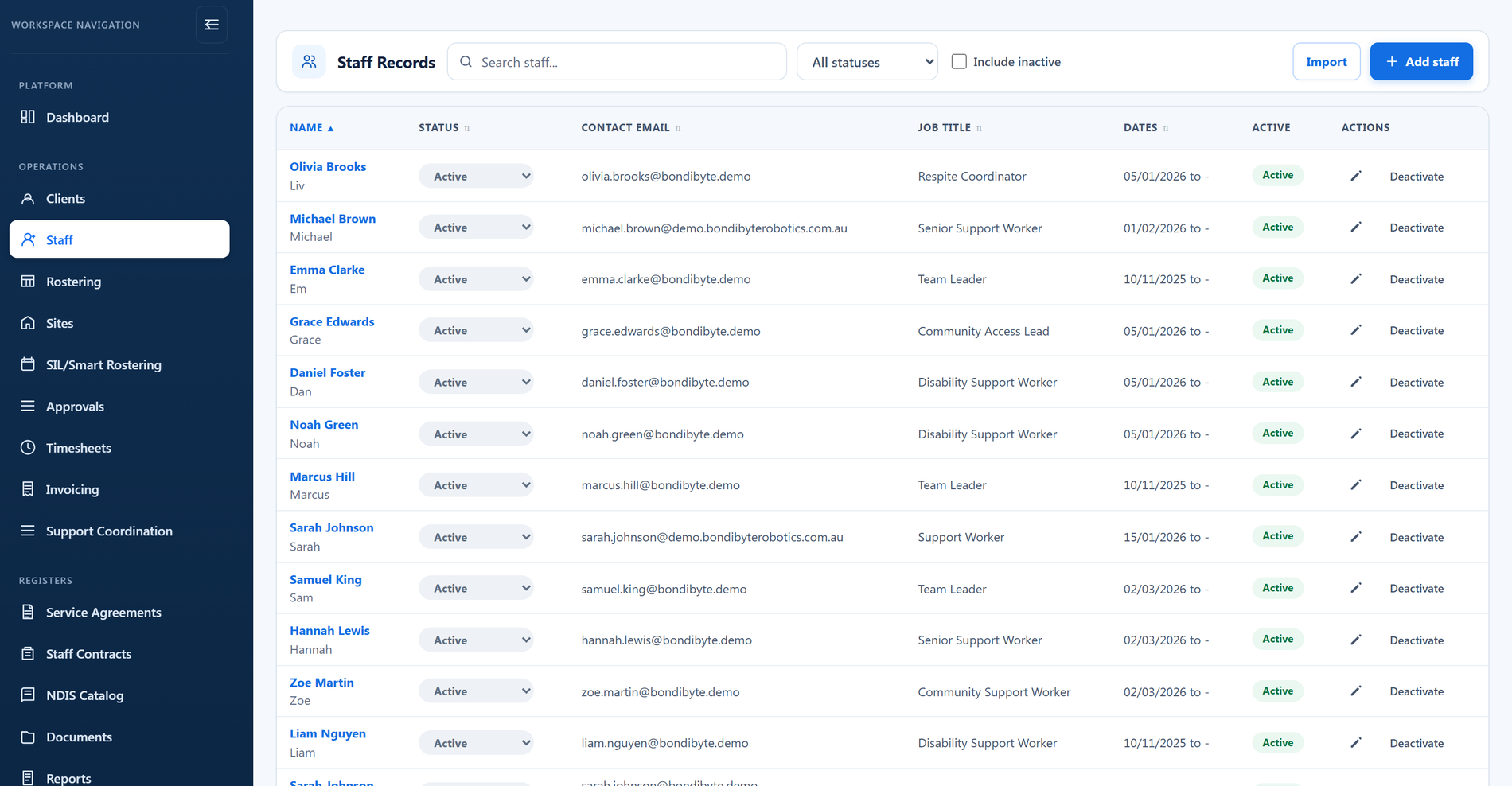
Digital staff onboarding
- Onboard one at a time or in bulk from a CSV
- Staged profiles ready to activate
- Send login details when ready
- Staff Contract Builder with PDF output
- Electronic signatures
- Centralised employee records

Managing employee records, onboarding, qualifications, availability, compliance, and approvals across multiple systems creates unnecessary admin and operational risk.
BondiByte brings workforce records into one connected platform, so you can onboard people, monitor evidence and give managers clearer operational visibility.
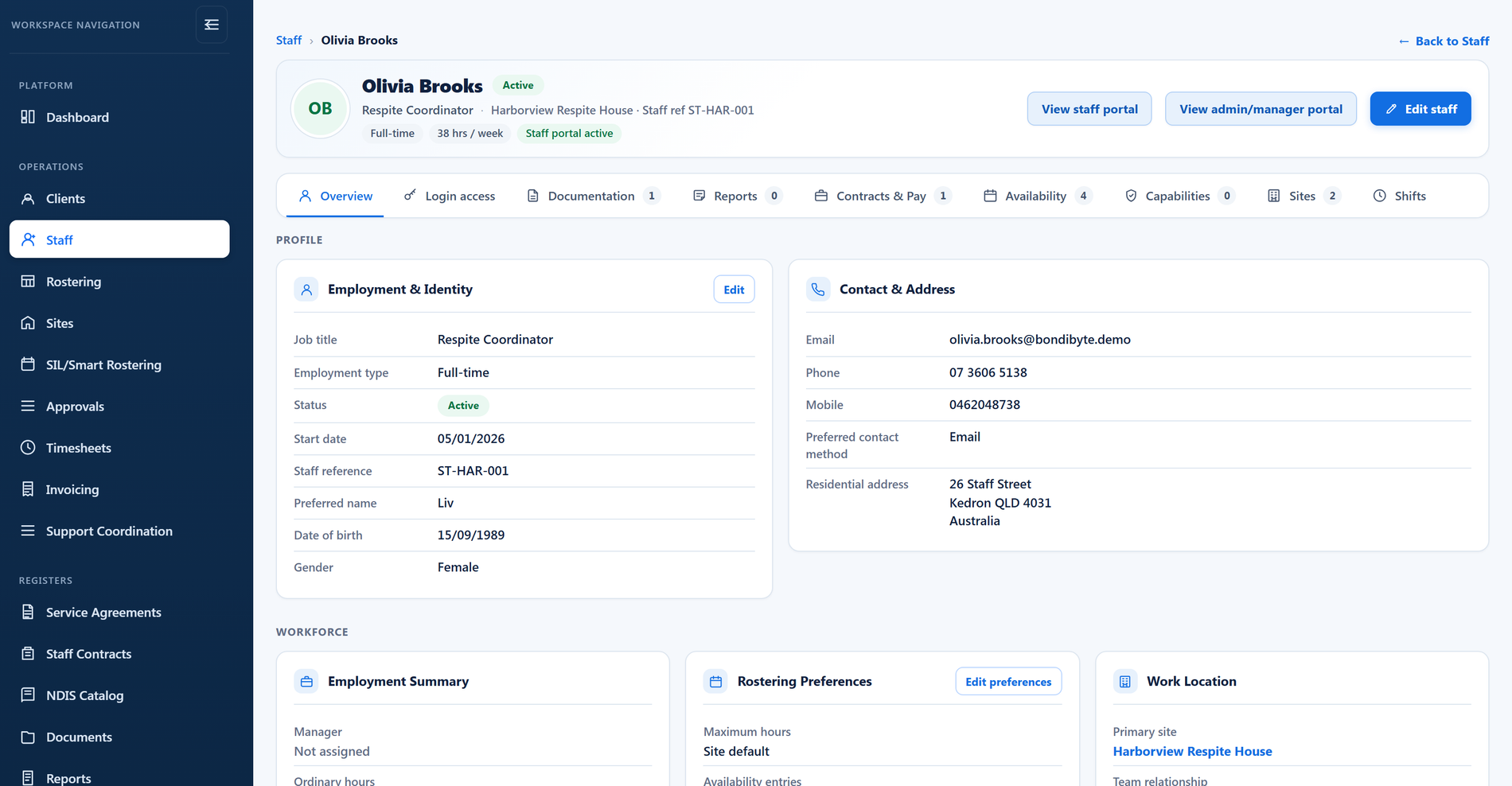
Unlike standalone HR software, BondiByte connects every workforce process. Capability and skills feed Smart Rostering, while contracts and pay levels connect through to timesheets and billing, so the staff record is more than a filing cabinet.
Requests like shift swaps, cancellations, leave, and document submissions land in one Approvals queue, each reviewed in place and linked straight from a notification.
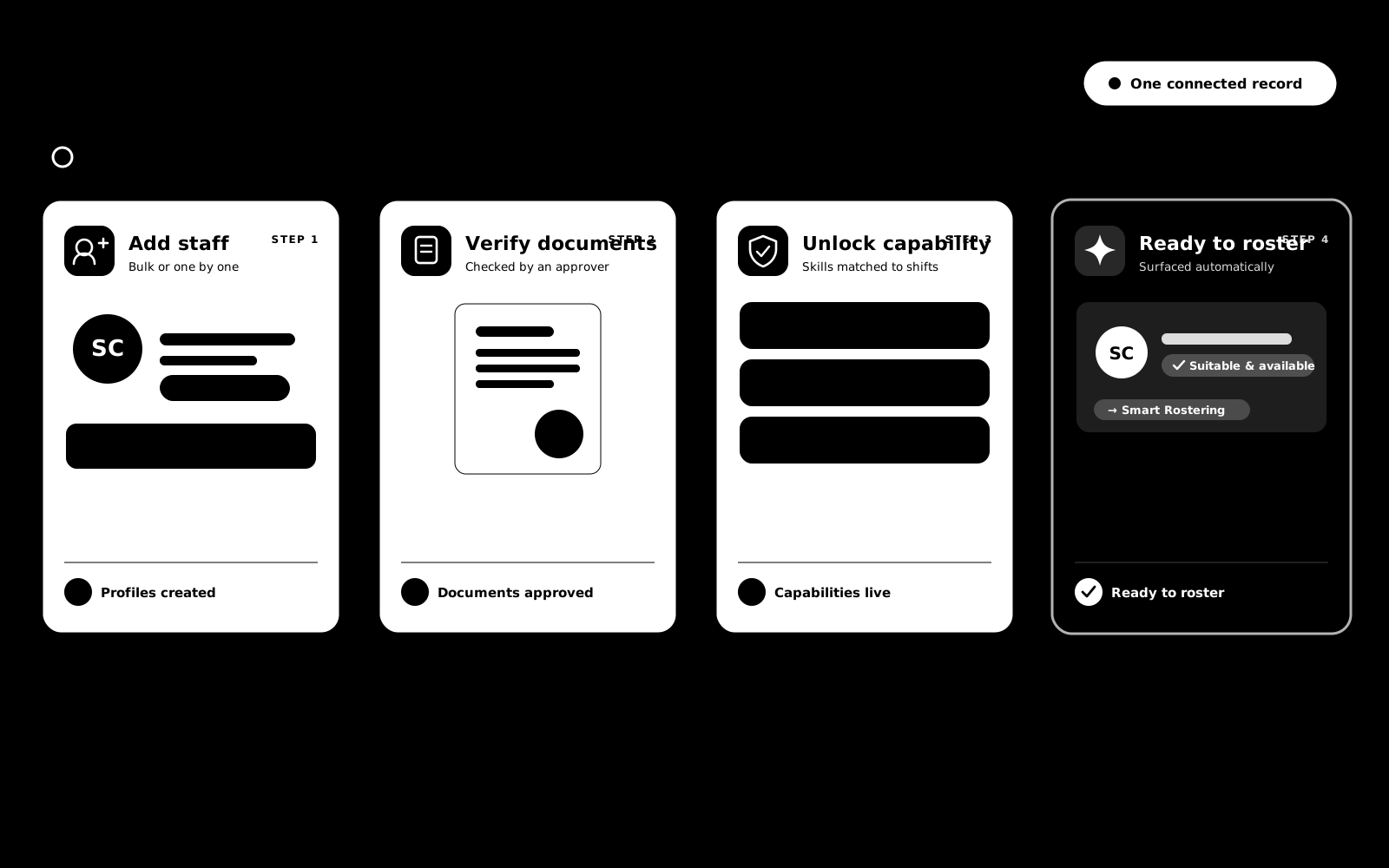
From the first contract to the latest timesheet, each staff member's record stays current and connected across rostering, compliance, and payroll. Documents are reviewed before they count, so a certificate only unlocks its linked capability once an approver has checked it.
As your workforce grows, your information stays organised, accessible, and always up to date.
Onboarding, capabilities, availability, hours, approvals, pay and contracts are parts of one connected record. Here is what each part does.
Add one support worker in minutes, or bring your whole team across in a single CSV import. Every record starts complete, so rostering, timesheets and compliance work from day one.
Every qualification, clearance and check lives on the staff record, backed by the actual document. Staff without current mandatory evidence are simply not offered the shifts that require it.
Staff record when they can and cannot work, leave is entered with real dates, and the roster honours all of it automatically.
Set safe working limits once and every roster respects them. BondiByte counts as you go, and stops an assignment before it pushes anyone past the limit.
Swaps, cancellations, open-shift claims, leave, document uploads and AI review items all land in one Approvals queue, each with the context to make the call.
Hold your pay levels in one place, and let staff records, contracts and timesheets read from it. No more hunting through spreadsheets after an award change.
Build your contract template once, generate a personalised PDF for each staff member with their details and pay filled in, and send it for e-signature.
Yes. Download the staff CSV template, fill it in without changing the columns, and upload it back. BondiByte validates the file and shows any problems before creating records.
Reminders go out before the expiry date at the lead times you set. If the evidence lapses anyway, the capability no longer satisfies mandatory requirements, and rostering blocks the person from affected shifts with a note that the evidence on file has expired.
Yes, through the staff portal and mobile app. Documents wait for manager approval before they count as evidence, and absences longer than your threshold wait for a manager's yes before they affect the roster.
Smart Rostering does not offer them the shift. The suitability result shows the projected hours against their capacity so you can see exactly why.
No. You define your pay levels and rates, and you confirm them against the relevant awards and the Fair Work system. BondiByte then applies them consistently across staff, contracts and timesheets.
Yes. The template is your document: paste in your wording and add your logo. BondiByte then finds the names, dates and pay details that should become variables, and you confirm each one before the template is saved. The wording itself stays your advisers' responsibility.
Set their status to inactive or terminated. They are excluded from rostering and from your active staff count straight away, while their record and history stay on file.
Each of these has its own page: why it exists, how it works, and the controls that stay with managers.
Add one support worker in minutes, or bring your whole team across in a single CSV import. Every staff record starts complete: contact and emergency…
Explore Staff profiles & onboardingFeatureEvery qualification, clearance and check lives on the staff record, backed by the actual document. When evidence is due to expire, BondiByte chases…
Explore Capabilities & qualification expiryFeatureSet safe working limits once and every roster respects them. Site defaults set the baseline, per-person caps handle real employment arrangements, and…
Explore Max-hours & capacity controlsFeatureStaff record when they can and cannot work, leave is entered with real dates, and the roster honours all of it automatically. Nobody gets rostered…
Explore Availability & leaveFeatureSwaps, cancellations, open-shift claims, leave, document uploads and AI review items all land in one Approvals queue. Each request arrives with the…
Explore Staff requests & approvalsFeatureConfigure pay levels and assign them so timesheet lines carry the right rate.
Explore Pay levelsFeatureBuild your contract template once, generate a personalised PDF for each staff member with their details and pay filled in automatically, and send it…
Explore Staff contractsStart your free trial, or book a demo to see onboarding, contracts, compliance, and workforce planning working together.
Hi, I can help with BondiByte features, pricing, setup and more.
Please don’t include sensitive participant or personal information.