Define what your operation requires
Create each capability with a clear name and type: training, qualification, skill or capability. Turn on expiry tracking for anything renewable, like screenings, licences and certificates.

Every qualification, clearance and check lives on the staff record, backed by the actual document. When evidence is due to expire, BondiByte chases the renewal, and staff without current mandatory evidence are simply not offered the shifts that require it.
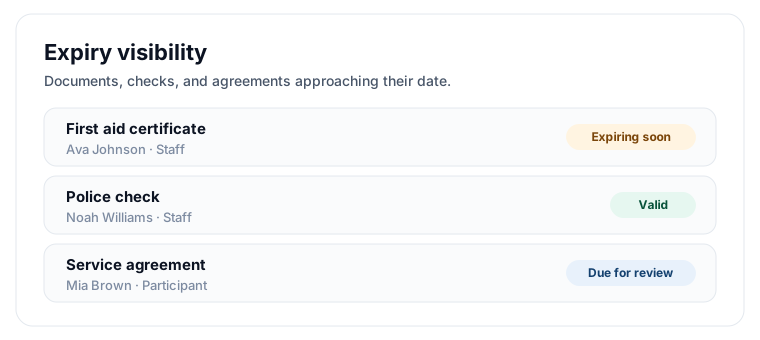
Define the qualifications and documents each role needs, so nothing important is left to memory.
Get ahead of expiring clearances and checks with reminders before they lapse.
Staff without the right current qualifications simply aren't offered the shift.

Every capability on the staff profile, backed by real evidence.

Uploading the matching document keeps the capability current.
Qualifications usually live in a filing cabinet or a spreadsheet column, and the first anyone hears about an expired first aid certificate is after the shift has already happened. Chasing renewals eats admin hours, and audit preparation becomes a scramble to find paper. BondiByte ties every qualification to the actual evidence document, tracks expiry, and keeps staff without current evidence off the shifts that require it.
Create each capability with a clear name and type: training, qualification, skill or capability. Turn on expiry tracking for anything renewable, like screenings, licences and certificates.
Creating a capability creates a matching staff document type. When the matching document is uploaded and approved against a staff member, their capability record updates automatically, including its expiry.
Add capability requirements to each site so the roster knows what that site's clients genuinely need. Different sites can require different things.
A missing mandatory capability is a hard block: that person is not offered the shift, and the reason says exactly which requirement is missing. Where evidence exists but has expired, the block says so, so you know it is a renewal problem rather than a training gap.
Expiry reminders go out at the lead times you configure, helping workers and managers act before evidence lapses.
Name each training, qualification, skill or check the way your auditors and coordinators talk about it, with its own expiry policy.
Each capability is proven by an uploaded document. Approving the document updates the capability record automatically, so the two never drift apart.
Each site lists the capabilities its clients need, and rostering checks candidates against that list.
Automatic reminders at the lead times you set, before evidence lapses, not after.
Staff can see their own outstanding evidence and receive configured reminders, moving action closer to the person who can fix it.
Expired evidence is called out separately from evidence that was never supplied, so you always know what kind of gap you are looking at.
A mandatory requirement blocks assignment outright; an optional one raises a warning managers can weigh up.
Documents staff submit through the portal only become trusted evidence, and only update capabilities, after a manager approves them.
You configure when expiry reminders go out, so chasing starts as early as your operation needs.
You choose what each site requires, so the roster enforces what clients genuinely need rather than a theoretical list.
Reminders go out before the expiry date at the lead times you set. If the evidence lapses anyway, the capability no longer satisfies mandatory requirements, and rostering blocks the person from affected shifts with a note that the evidence on file has expired.
Yes, through the staff portal and mobile app. Their submissions wait for manager approval before they count as evidence or update any capability.
No. You turn expiry on per capability. Use it for renewable things like screenings and licences, and leave it off for skills that do not lapse.
Yes. Capability requirements are set per site, so a high-support house can require more than a community access service.
No. Only mandatory requirements block assignment. An optional gap is surfaced as a warning so managers can make the call.
Onboarding, capabilities and qualification expiry, availability and leave, hour caps, pay levels, contracts and approvals in one connected record.
Staff & WorkforceAdd one support worker in minutes, or bring your whole team across in a single CSV import. Every staff record starts complete: contact and emergency details, employment and right to work, pay level, sites and rostering preferences, so rostering, timesheets and compliance work properly from day one.
Staff & WorkforceSet safe working limits once and every roster respects them. Site defaults set the baseline, per-person caps handle real employment arrangements, and Smart Rostering will not assign anyone past their limit.
Staff & WorkforceStaff record when they can and cannot work, leave is entered with real dates, and the roster honours all of it automatically. Nobody gets rostered into a window they told you they could not work.
Staff & WorkforceSwaps, cancellations, open-shift claims, leave, document uploads and AI review items all land in one Approvals queue. Each request arrives with the context to make the call, and every decision leaves a record.
Staff & WorkforceConfigure pay levels and assign them so timesheet lines carry the right rate.
Start your free trial, or book a demo to see it with your own operation in mind.
Hi, I can help with BondiByte features, pricing, setup and more.
Please don’t include sensitive participant or personal information.