
BondiByte Staff App for iOS and Android | BondiByte
The staff app

Support work does not happen at a desk. Neither should the admin.

Your team is in a house, in a car, or halfway through a community shift. Asking them to find a computer to check a roster, claim an open shift or file a report is how things get missed, and how managers end up chasing.

The BondiByte Staff app is out now on the App Store and Google Play. It gives every worker their shifts, their timesheets, their reports and their documents on the phone already in their pocket, and everything they do lands straight back on the roster their managers are working from.

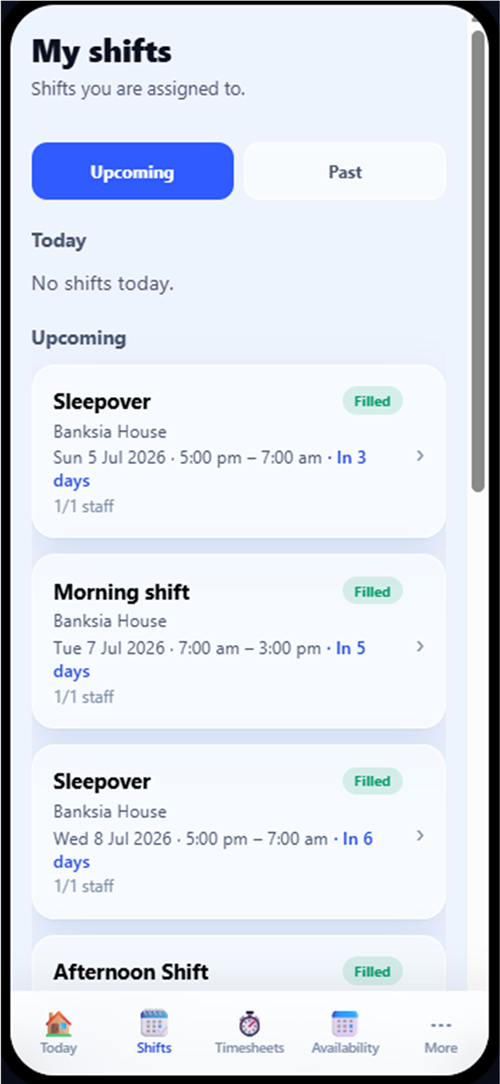
The BondiByte Staff app My shifts screen showing upcoming sleepover and morning shifts at Banksia House with filled status badges, and the Today, Shifts, Timesheets, Availability and More tabs

Everything a support worker needs, and nothing they do not.

The day, on the phone

Open the app and the day is already laid out.

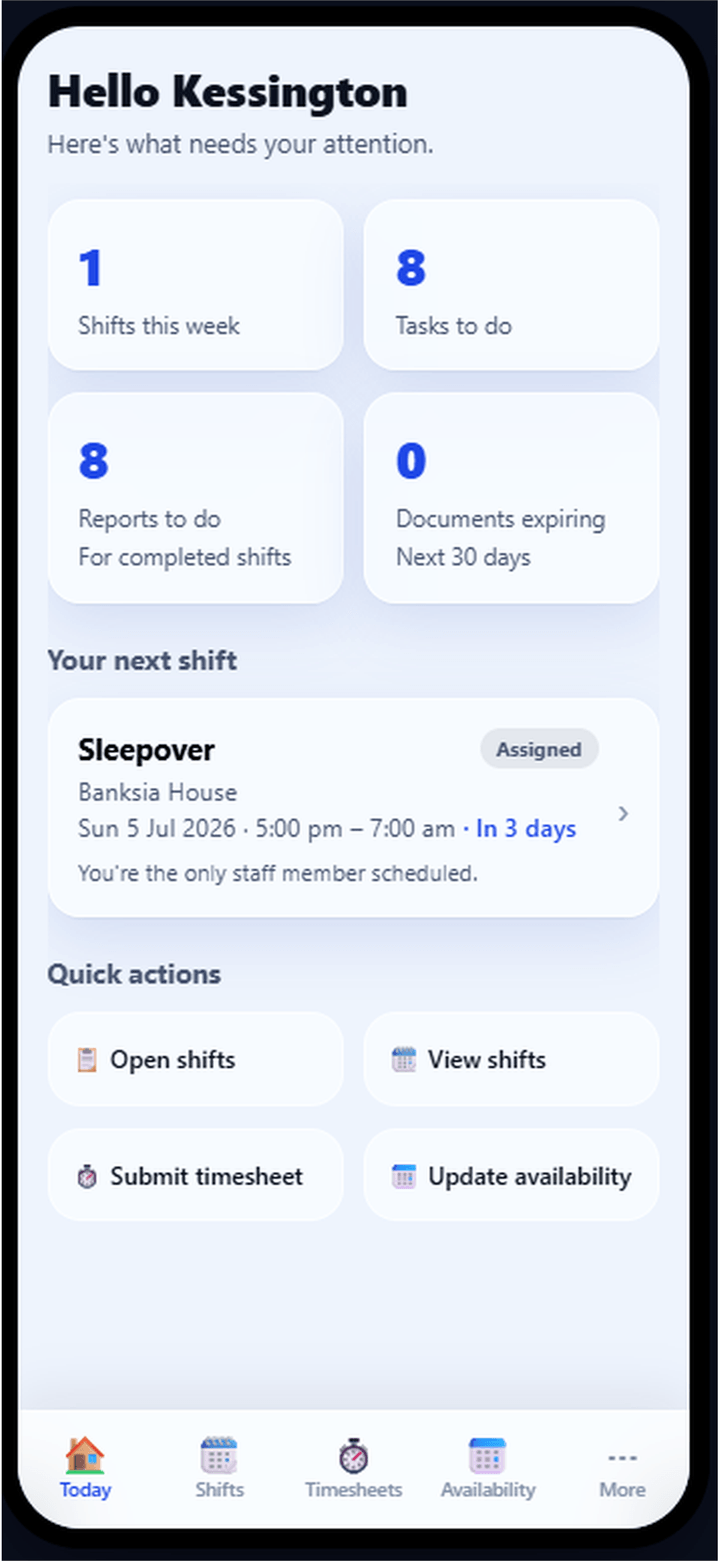
  • Shifts this week, tasks to do and reports owing
  • Documents expiring in the next thirty days
  • Your next shift, with the site and the times
  • Upcoming and past shifts, with the detail behind each one
  • Quick actions for shifts, timesheets, availability and open shifts

Getting and giving back work

The requests that used to be phone calls and messages.

  • See open shifts your site has released and request one
  • Withdraw a request while it is still waiting
  • Register interest in work before a roster is built
  • Request a swap with another worker
  • Request to cancel a shift you can no longer work
  • Track where each request got to

Time and pay

Attendance and timesheets, on the spot.

  • Clock in and clock out on the shift
  • Your location recorded with the shift where your site uses it
  • Timesheets built from your rostered work
  • Check a pay period and submit it
  • Set availability, and request leave

Records and compliance

The paperwork that keeps you rosterable.

  • Write a shift report or an incident report, with photos attached
  • See the reports you have written
  • See what is current, expiring, expired or missing
  • Upload a renewal, which goes to your manager for approval
  • See your own ratings, and how they are worked out
  • Message your coordinator without leaving the app
The BondiByte Staff app Today screen greeting the worker with shifts this week, tasks to do, reports to do, expiring documents, their next shift, and quick actions for open shifts, timesheets and availability
Today

One screen that answers what needs doing.

The app opens on Today. Shifts this week, tasks to do, reports still owing, and documents expiring in the next thirty days sit together at the top, followed by the next shift and the actions people use most.

It is deliberately small. A worker should be able to see whether anything needs them in about five seconds, and get on with the shift.

Less chasing for managers. Less guessing for staff.
Clock in and attendance

Attendance recorded where the shift happens.

Clock in and clock out sit on the shift itself, so nobody has to remember a separate app or write times on a sheet. The time is recorded against that shift, ready for the timesheet that follows.

Whether location is involved is a decision each site makes, not a decision the app makes. A site can simply record where a worker was, or require them to be within a set distance before clock in is accepted. Workers see the rule on the shift before they try.

If someone clocks out moments after clocking in, the app treats it as the mis-tap it almost always is and lets them start again, rather than quietly recording a shift that never happened.

See how per-site clock-in rules are set.

  1. Open the shift
  2. Clock in
  3. Work the shift
  4. Clock out
  5. Time recorded against the shift
  6. Timesheet ready to review

Straight answers about what the app does.

Mobile apps get oversold. Here is what a few of the usual assumptions actually look like in the BondiByte Staff app, so nobody finds out on a night shift.

The usual assumption
What actually happens
It is a full offline app
Without a connection the app shows you the last data it synced, so your shifts and timesheets are still readable. Submitting work needs a connection.
It scans documents with a camera
You attach a document from your phone's own files. It goes to your manager for approval, the same as an upload from a computer.
Clock in works from anywhere
Your site decides. Some sites simply record where you were, and some require you to be within a set distance of the site before clock in is accepted.
One app per employer
If you work for more than one organisation on BondiByte, you sign in to each once and switch between them with a tap.
Ratings are published to your team
Only you and your managers can see your ratings, and the app explains exactly what they are based on.

Signed in securely, reachable when it matters.

Signing in

The same account as the browser, on the phone.

  • Sign in with your work email and password
  • Set your password from the invitation your organisation sends
  • Enter an authenticator code when your organisation requires a second step
  • Change your password in the app

Notifications

A tap takes you to the thing itself.

  • Push notifications on iOS and Android
  • New and changed shifts, swaps, cancellations and tasks
  • Timesheets, documents and compliance items
  • Tapping a notification opens the right screen, in the right organisation
  • A notifications list in the app for everything you have been sent

Made to suit you

Small settings that matter on a long shift.

  • Light, dark, or follow the phone
  • 12-hour or 24-hour times
  • Your profile and organisation details
  • Sign out from the app at any time

The app is available to staff of organisations using BondiByte. It is not a public account you can sign up for on its own. Read the staff app privacy notice.

Connected to the roster

The same record, seen from the shift.

The app is not a separate system with its own copy of the roster. It is the Staff Portal shaped for a phone, reading and writing the same records your managers use.

A roster published in Smart Rostering reaches the worker as a notification. What they clock, write and submit comes back as timesheets to approve and reports to review, without anyone re-keying it.

One record. Two places to see it. No re-keying.
  1. Roster published
  2. Push notification
  3. Shift in the app
  4. Clock in and clock out
  5. Shift report
  6. Timesheet submitted
  7. Manager approval

Put the roster in your team's pocket.

Start your free trial, or book a demo to see the staff app, the Staff Portal and the roster working as one record.

Start free trial