BondiByte watches the work
Roster coverage, document expiry dates and open incidents are checked continuously in the background, without anyone having to remember to look.

Automated signals raise the right alert to the right owner: coverage risk, document expiry, incident severity.

Get alerted to coverage gaps and expiring documents before they become problems.
Serious incidents raise the right alert to the right person, fast.
Alerts go to whoever can actually fix it, not a noisy group inbox.
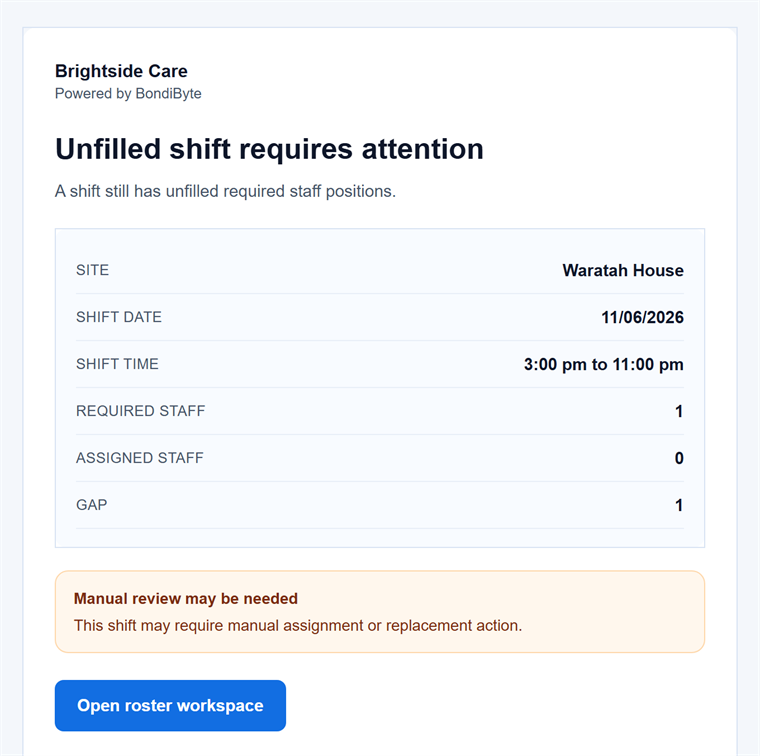
An unfilled-shift alert with everything needed to act (demo data).
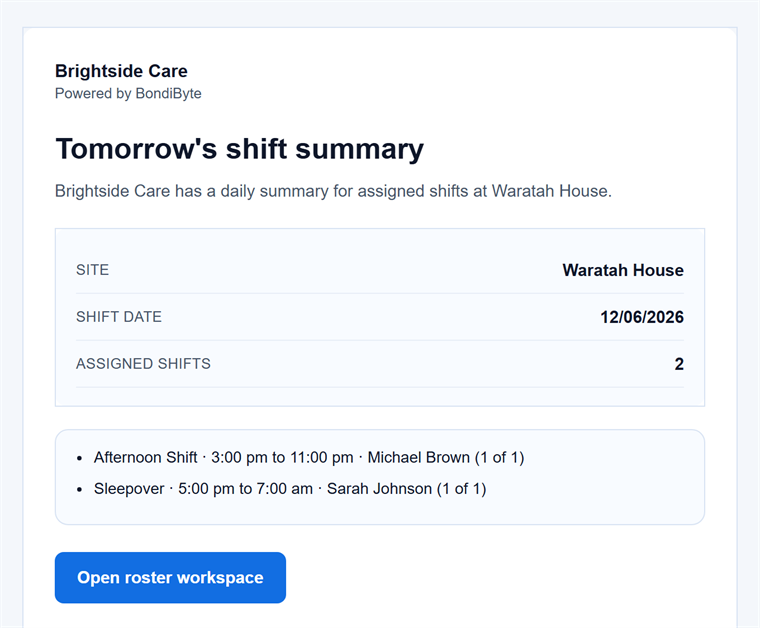
The daily roster summary managers wake up to (demo data).
In disability support, the expensive problems are the ones nobody noticed in time: a shift still unfilled the night before, a worker's screening check quietly expiring, an incident sitting unresolved for days. Group inboxes and spreadsheets do not chase anyone. You need alerts that find the person who can actually fix the problem, while there is still time to fix it.
Roster coverage, document expiry dates and open incidents are checked continuously in the background, without anyone having to remember to look.
A shift for the week ahead is still unfilled and getting close, a document is approaching expiry, or an incident has been open and unresolved for more than 48 hours.
Alerts go first to the manager responsible for that site, with admins as the fallback, rather than landing in a shared inbox nobody owns.
Each alert names the site, shift, gap, document or incident concerned, so the person receiving it can act straight away instead of going looking.
Alerts are deduplicated and repeat warnings are spaced out, so a known problem does not hammer the same inbox every half hour.
Upcoming unfilled shifts across the week ahead are raised to site managers, with escalation as the shift gets close.
Each site's managers can receive a summary of tomorrow's assigned shifts, so the day starts with no surprises.
Scheduled scans watch expiring staff, client, agreement and contract documents and send configured reminders before dates lapse.
Related routine reminders can be grouped into a single organised email where grouping is appropriate, instead of one email per reminder.
Incidents left unresolved for more than 48 hours are escalated by email, and follow-ups that fall due trigger their own reminders.
As automation usage approaches your monthly allowance you are warned early, so limits never arrive unannounced.
Alerts arrive by email and can also appear as notifications inside the workspace, so they are seen wherever your team works.
Document expiry scans, incident escalation and roster notifications each have their own owner-held switch, so you run only the alerts you want.
Each site can have a nominated manager for notifications, with your admins as the fallback when none is set.
Duplicate suppression and spacing between repeat warnings are built in, so alerts stay meaningful instead of becoming noise. Related routine reminders can also be grouped into one organised email, while urgent or action-sensitive notifications still arrive individually.
An alert is a prompt for human review, never an automatic decision made on your behalf.
The manager nominated for the site where the problem is, falling back to your admins. The principle throughout is to notify the person who can act, not a group inbox.
Alerts are deduplicated, repeat warnings are spaced out, and capacity warnings send only the single most relevant threshold, so each email you receive is one worth opening.
Yes. Owners and admins can switch each alert family independently, so you can run unfilled shift alerts without incident escalation, or the reverse.
No. Alerts surface a risk for a person to act on. Where automation can also help, such as offering a cancelled shift to suitable staff, that is a separate switch you enable deliberately.
Unfilled shift alerts and escalation, daily roster summaries, document expiry reminders, incident escalation and follow-up reminders, audit workflow reminders and automation capacity warnings.
No. Grouping applies to related routine reminders, combined into a single organised email where that reduces separate messages without losing detail. Urgent or action-sensitive notifications, such as incident escalation or a shift close to going unfilled, are not folded into a digest and still arrive on their own.
BondiByte meters the automated work it does for you, so owners can govern usage with a clear allowance.
Automation & AIAutomation you switch on one workflow at a time, operational alerts that find the person who can act, optional AI assistance a person always reviews, and the time given back made visible. Owners and admins hold the switches, and every run is recorded and metered.
Automation & AIEvery time automation completes real work, BondiByte records a conservative estimate of the admin minutes it replaced, and shows you the running total.
Automation & AIAI assistance is off until your organisation turns it on, and then you choose each function separately. Every result waits for a person, the original records are never changed, and the work is metered like any other automation.
Start your free trial, or book a demo to see it with your own operation in mind.
Hi, I can help with BondiByte features, pricing, setup and more.
Please don’t include sensitive participant or personal information.