Publish the roster
Once a roster period is published, any shift that still has fewer staff assigned than it requires becomes an open shift. There is no separate list to maintain: the gap on the roster is the gap staff see.

A shift on a published roster that still needs someone becomes an open shift for the teams you choose. Staff claim it from their phone, you decide whether the first claim takes it or an approver does, and approving one claim declines the rest.

Short demonstrations in the real product, using made-up data. Choose a part to watch it here.
Watch the full series on YouTube (opens YouTube in a new tab)
Any published shift still short of its required staff is offered to eligible workers instead of sitting empty on a board.
Each site decides whether the first eligible claim assigns the shift, or whether it waits for a manager to say yes.
Approving a claim assigns that worker and declines the others, with everyone told where they stand.
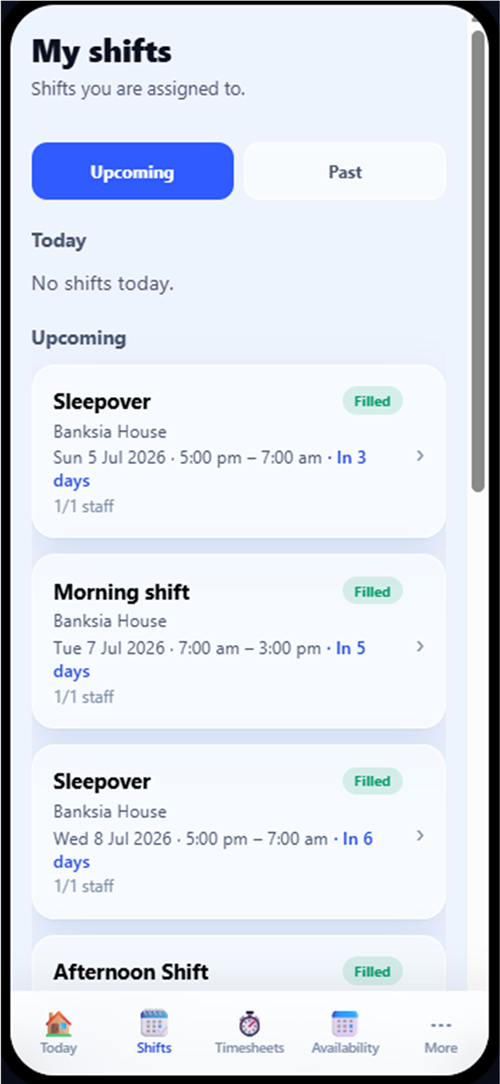
Staff see and claim the open shifts they are eligible for, from their own device.
An uncovered shift usually becomes a ring-around. Someone works down a list, the same reliable few get asked first, and staff who would happily have picked it up never hear about it. Meanwhile nobody can say who was offered what. Publishing the gap turns that scramble into a queue: the workers who are eligible see it, the ones who want it claim it, and the decision is made once and recorded.
Once a roster period is published, any shift that still has fewer staff assigned than it requires becomes an open shift. There is no separate list to maintain: the gap on the roster is the gap staff see.
Each site decides which of its teams open shifts reach. Primary team staff always see them. Secondary team and relief staff are each a separate site setting, so you can widen the pool only when you want to.
In the staff portal and mobile app, a worker sees the open shifts they are eligible for, with the site, date, times and sleepover detail, and claims the one they want.
If the site requires an approver, the claim waits in the Approvals queue for the site manager or an admin. If it does not, the first eligible worker to claim is assigned immediately.
Approving a claim assigns that worker to the shift and declines every other pending claim on it, notifying each person. Nobody is left wondering whether they got it.
A published shift still under its required staff count is automatically claimable. No parallel list to keep in step with the roster.
Staff only ever see open shifts they can actually work. The same suitability and safety checks that govern assignment govern what appears.
Show a site's open shifts to primary team staff only, or extend them to the secondary team, relief staff, or both. Every site sets this for itself.
Turn the approver requirement off and the first eligible claim takes the shift. Leave it on and a manager decides. It is a site-level setting, so a stable house and a complex one can run differently.
A single decision assigns the worker and closes off the other claims on that shift, with each claimant notified rather than left waiting.
Plans change. A worker can withdraw a claim they have made, which takes them out of the running without anyone having to chase it.
Open shift requests get their own tab alongside swaps, cancellations, leave and documents, with a live count of what is waiting.
Secondary team and relief visibility are separate switches on each site, so widening the pool is always a deliberate act.
Require an approver where the shift is sensitive, and let claims self-assign where speed matters more. Both are per-site settings you can change at any time.
Opening a shift never relaxes the rules. A worker who does not meet the site's capability requirements, or who is already committed, never sees it.
Claims, approvals, declines and withdrawals are all recorded, so you can always show how a shift came to be filled the way it was.
By being published and still needing staff. Once the roster period is published, any shift with fewer people assigned than it requires is claimable by the eligible workers at that site. Nothing extra to publish.
No. Staff only see open shifts at sites they are assigned to, and only where they meet the site's requirements. Secondary team and relief staff see them only if that site has chosen to include them.
That is your call, per site. Turn the approver requirement off and the first eligible claim assigns the shift. Leave it on and the claim waits in Approvals for a manager.
Approving one claim declines the others on that shift and notifies each of them, so nobody is left holding an open request that will never be answered.
Yes. A claim can be withdrawn from the staff portal before it is decided, and the shift simply returns to the pool.
The full rostering cycle in one supervised workflow: patterns and periods, shift creation, suitability and hard-block checks, weighted recommendations, sleepovers, and scheduled automation.
Smart RosteringReal rosters change: someone cancels, someone wants to swap, a gap appears. BondiByte turns each change into a proper workflow: staff interest collected before assignment, open shifts claimed from the phone, cover offers when someone cancels, swaps that keep the roster true, and escalation that makes sure a gap is never discovered the morning of the shift.
Smart RosteringSet up your roster calendar once, capture how each site really runs, and let every future period start from that shape.
Smart RosteringCreate a whole period of shifts from your configured patterns and site or period settings, including recurring shifts.
Smart RosteringAsk the whole team who wants the shifts, in one step, and get answers you can actually roster from. Staff respond from their own portal, unsuitable responses are filtered out automatically, and interest flows straight into the roster suggestions.
Smart RosteringCritical conflicts are blocked before staff are even considered, then suitability signals rank who fits best.
Start your free trial, or book a demo to see it with your own operation in mind.
Hi, I can help with BondiByte features, pricing, setup and more.
Please don’t include sensitive participant or personal information.