Set up templates per site
Give each house or site its own shift templates with the default times, required staff numbers and sleepover detail that match how that site actually runs.

Create a whole period of shifts from your configured patterns and site or period settings, including recurring shifts.
Generate a whole period of shifts from your saved pattern in one step, not cell by cell.
Each house or site gets templates that fit how it actually runs, so the right shifts appear every time.
Roll out recurring shifts by a set count or out to a date, and adjust the batch without redoing the lot.
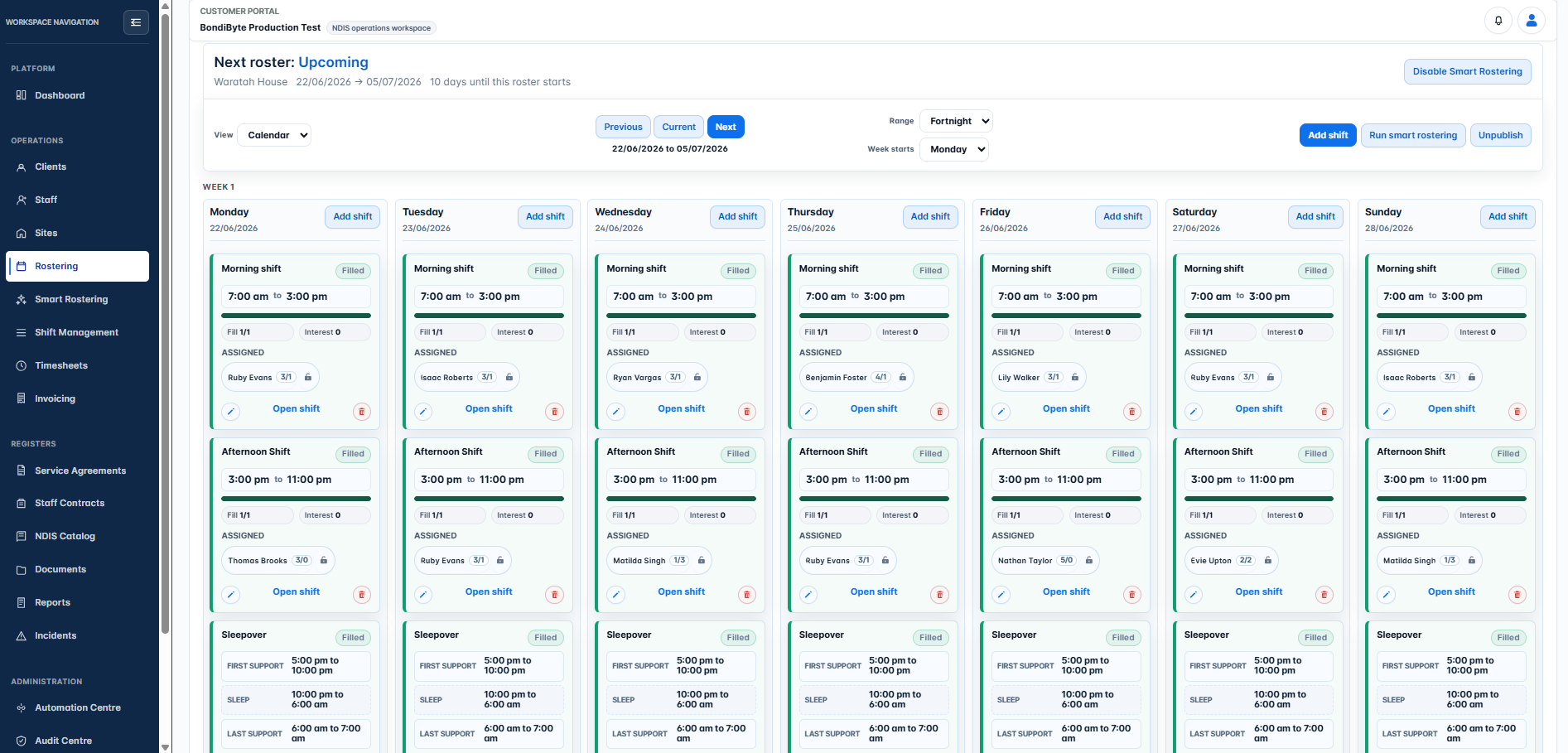
A whole period of shifts, created from templates and patterns in one pass.
Entering shifts one cell at a time is the slowest part of rostering, and the most error-prone. Recurring supports drift when someone forgets a week, every house runs a slightly different day, and a mistyped time surfaces later as a payroll or billing problem. The work is repetitive, but it still has to be right every single period.
Give each house or site its own shift templates with the default times, required staff numbers and sleepover detail that match how that site actually runs.
Create a single shift, or set it to repeat daily or weekly, at the interval and on the weekdays you choose. Overnight shifts that end the next day are handled properly.
Repeat by a set count or out to an end date, whichever fits the support, with a sensible cap so a typo cannot flood the roster.
Once a site has an active pattern and Smart Rostering is on, BondiByte creates the new period's shifts from your active pattern ahead of time, on the schedule you set.
Shifts land on the board carrying their client, staffing numbers, sleepover and billing context. Staff only see them when you publish.
Templates belong to the site they describe, so the right shifts appear with the right defaults every time.
Daily or weekly repeats, every one or more weeks, on exactly the weekdays you pick.
Roll a support out for the next twelve occurrences, or out to a date, without creating each shift by hand.
With a pattern active, a full period of shifts is generated in one pass instead of being entered by hand.
Shifts that cross midnight and sleepover shifts carry their real times from the moment they are created.
Client billing line items can be set on the shift, so what you roster is what you later invoice.
Choose how many days before a period starts its shifts are created, so rosters are ready early without being built too far ahead.
Recurring setups are capped and linked as a group, so a bad entry cannot silently generate years of shifts.
Turn on a manager email when shifts are created for a site, or leave it quiet if you would rather check the board.
Created shifts sit in the roster until a manager publishes. Staff are notified at publish, not at creation.
Yes. A shift can end the next day, and sleepover shifts carry their own segment times so the overnight structure is recorded properly.
Up to 370 shifts per recurring batch, repeating daily or weekly by count or to an end date. That covers a year of daily shifts while keeping accidental floods impossible.
No. Shifts become visible to staff when the roster is published, so you can build and adjust freely first.
No. Templates are there to speed up sites with a stable structure. You can always add one-off shifts directly on the board.
Templates and recurring shifts build your base roster. A pattern captures that structure so future periods are generated automatically. Patterns take over the repeat work once the site has an active pattern. Until then, recurring shifts stay available even with Smart Rostering switched on, so you can build the first fortnight by hand.
The full rostering cycle in one supervised workflow: patterns and periods, shift creation, suitability and hard-block checks, weighted recommendations, sleepovers, and scheduled automation.
Smart RosteringReal rosters change: someone cancels, someone wants to swap, a gap appears. BondiByte turns each change into a proper workflow: staff interest collected before assignment, open shifts claimed from the phone, cover offers when someone cancels, swaps that keep the roster true, and escalation that makes sure a gap is never discovered the morning of the shift.
Smart RosteringSet up your roster calendar once, capture how each site really runs, and let every future period start from that shape.
Smart RosteringAsk the whole team who wants the shifts, in one step, and get answers you can actually roster from. Staff respond from their own portal, unsuitable responses are filtered out automatically, and interest flows straight into the roster suggestions.
Smart RosteringCritical conflicts are blocked before staff are even considered, then suitability signals rank who fits best.
Smart RosteringOnce blockers clear, BondiByte ranks and prepares assignment options using the signals that matter to your operation.
Start your free trial, or book a demo to see it with your own operation in mind.
Hi, I can help with BondiByte features, pricing, setup and more.
Please don’t include sensitive participant or personal information.