Staff start the swap from their portal
A staff member opens the shift they cannot work and requests a swap, offering one or more of their shifts in exchange. The option only appears where your organisation allows swaps.

Handle swap requests, approvals, and replacement needs without breaking roster integrity.

Staff raise swaps themselves from their phone, so changes don't get lost in calls and messages.
Every swap routes to a manager to approve, keeping you in control of who covers what.
Swaps respect the same suitability and safety rules, so coverage never quietly breaks.
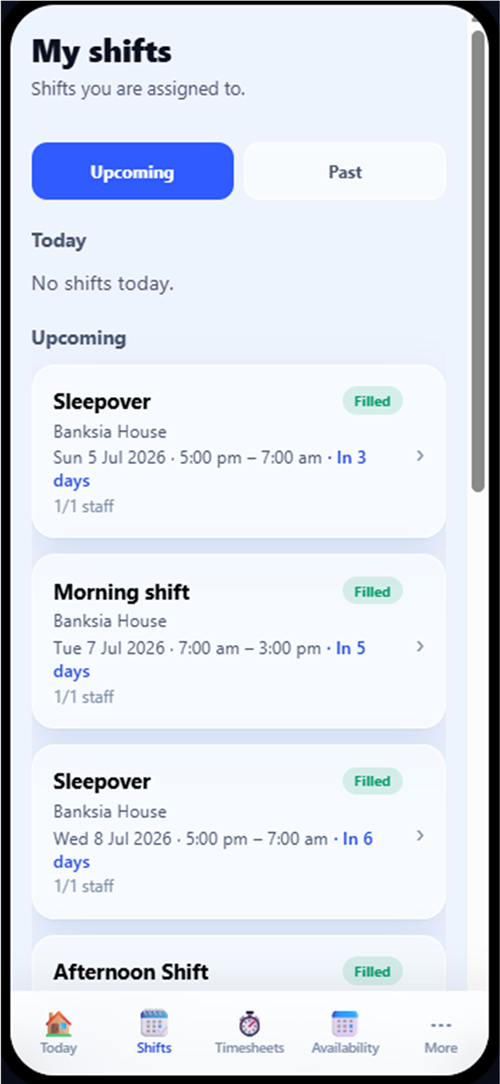
Staff manage their shifts, including swap requests, from their own device.
Swaps arranged over text feel harmless until the roster no longer matches reality. The manager finds out after the fact, nobody checked whether the stand-in was qualified or already working, and payroll is reconciling a shift that officially belonged to someone else. Staff need flexibility; the organisation needs the swap to go through the roster, not around it.
A staff member opens the shift they cannot work and requests a swap, offering one or more of their shifts in exchange. The option only appears where your organisation allows swaps.
BondiByte presents the swap options that are actually workable, so staff are choosing among realistic exchanges rather than free-texting a plan.
The proposed swap goes to the other person, who accepts or declines it from their own portal. Nobody is swapped without agreeing.
Where approval is required, an accepted swap waits for a manager to approve or reject it before the roster changes. You keep control of who covers what.
Once approved, assignments are updated in the roster itself and the request history is kept, so the published roster, timesheets and records all agree.
Staff raise swaps from their phone instead of ringing the office, with the request captured properly from the start.
Staff choose from eligible swap options rather than proposing anything at all, which keeps requests realistic.
The staff member on the other side of the swap always gets the choice.
Accepted swaps line up in Approvals with clear statuses, ready for a quick approve or reject.
Each staff member can have one outgoing swap request open at a time, and can cancel it, which keeps the queue clean.
Shift swapping ships switched off. An owner or admin enables it for the organisation, and each site then decides separately whether its staff can raise a swap. Until both are on, the option is not in the staff portal at all and managers arrange every change themselves.
Require manager approval before a swap takes effect, so an agreed swap is still a proposed swap until you say yes.
Set a site-level limit on how many swaps each staff member can request, so swapping stays occasional rather than routine.
No. Staff choose from the eligible options BondiByte presents, the other person must accept, and where approval is required a manager confirms before the roster changes.
No. One active outgoing request at a time. They can cancel it and start another if plans change.
They simply decline from their portal. The requester can cancel the request or wait on their other offered options.
No. Swapping starts switched off. Until an owner or admin turns it on for the organisation and a site allows it, staff cannot raise a swap and every change goes through a manager. Switching it on later is a deliberate decision, and you can switch it back off.
In the Approvals area, where requests appear with their status and can be approved or rejected in a couple of clicks.
The full rostering cycle in one supervised workflow: patterns and periods, shift creation, suitability and hard-block checks, weighted recommendations, sleepovers, and scheduled automation.
Smart RosteringReal rosters change: someone cancels, someone wants to swap, a gap appears. BondiByte turns each change into a proper workflow: staff interest collected before assignment, open shifts claimed from the phone, cover offers when someone cancels, swaps that keep the roster true, and escalation that makes sure a gap is never discovered the morning of the shift.
Smart RosteringSet up your roster calendar once, capture how each site really runs, and let every future period start from that shape.
Smart RosteringCreate a whole period of shifts from your configured patterns and site or period settings, including recurring shifts.
Smart RosteringAsk the whole team who wants the shifts, in one step, and get answers you can actually roster from. Staff respond from their own portal, unsuitable responses are filtered out automatically, and interest flows straight into the roster suggestions.
Smart RosteringCritical conflicts are blocked before staff are even considered, then suitability signals rank who fits best.
Start your free trial, or book a demo to see it with your own operation in mind.
Hi, I can help with BondiByte features, pricing, setup and more.
Please don’t include sensitive participant or personal information.