Start the preview from the staff profile
One action on the staff record opens that person's portal in a logged support preview session, with the reason recorded.

When a staff member says their portal looks wrong, open a logged, read-only preview of exactly what they see. Diagnose the real problem in minutes instead of trading screenshots.

Open exactly what a staff member sees to troubleshoot in seconds, without guessing.
Every preview is recorded, so support access stays accountable.
Only owners and admins can use it, keeping this powerful view tightly controlled.
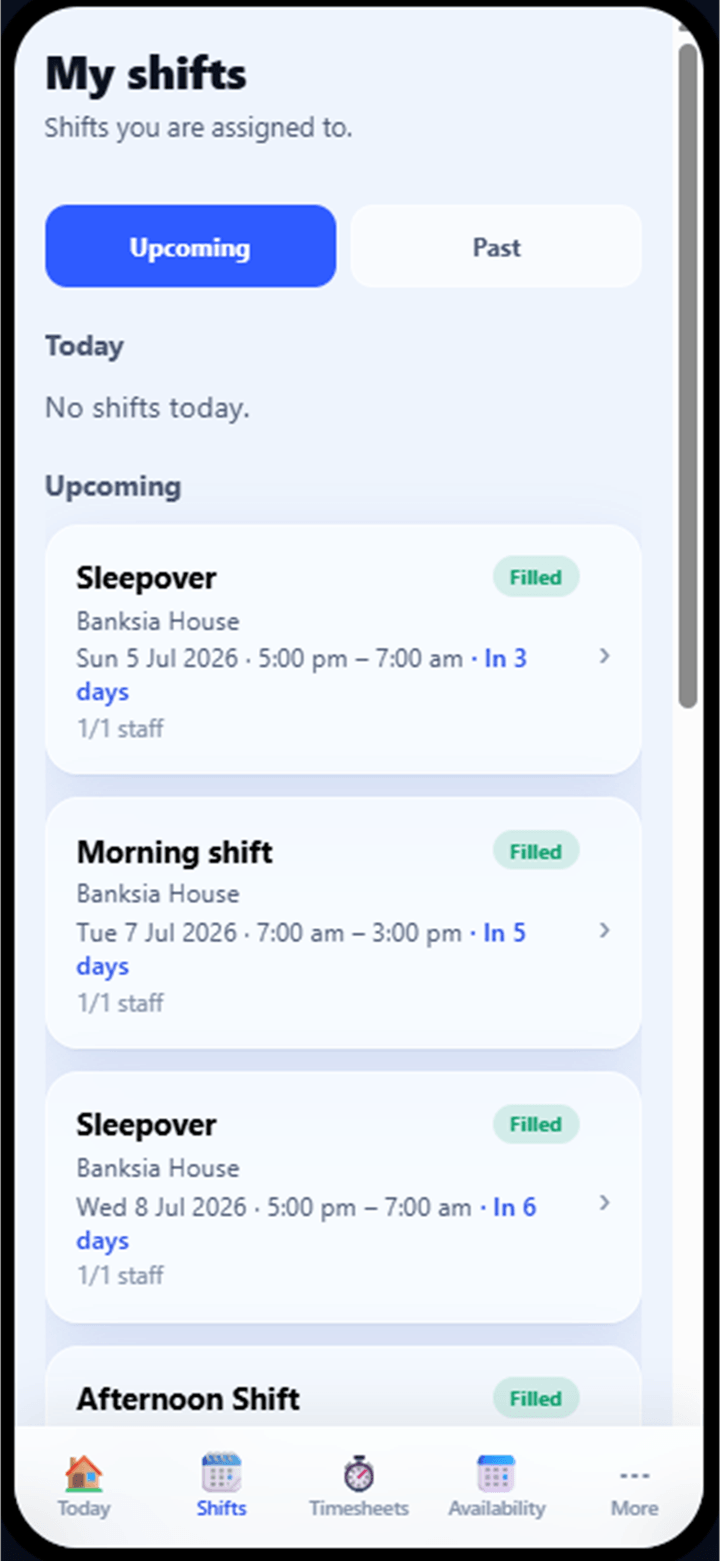
The staff portal view: the support preview shows it exactly as the staff member sees it.
"My app isn't showing my shift." Without seeing what the staff member sees, troubleshooting becomes screenshots over text message and guesswork over the phone. BondiByte lets the right people open a logged, strictly read-only preview of that person's portal and find the real answer in minutes.
One action on the staff record opens that person's portal in a logged support preview session, with the reason recorded.
Shifts, documents, timesheets and notifications render exactly as that staff member's account shows them, so a missing shift or a stuck document is visible immediately.
The preview is strictly read-only. Any attempt to act is refused, and the preview cannot even mark the staff member's notifications as read.
Who opened the preview, whose portal, when, and why are all logged, sessions expire automatically after four hours, and you can end one at any time.
With the actual view in front of you, the fix is usually obvious: an unpublished roster, an unlinked account, a document waiting on approval.
Open a staff member's portal view straight from their profile, no password sharing, no borrowed phones.
The preview renders the portal exactly as that person's account does, including their shifts, documents and notifications.
Nothing can be submitted, accepted or changed from inside a preview. The block is enforced on every action.
Session start, the person previewed, the reason given and even the pages viewed are recorded.
Preview sessions expire automatically after four hours and can be ended early at any time.
Alongside the staff portal preview, owners and admins can also preview the management workspace as another user's role sees it.
Only owners and admins can start a staff view by default, and the permission is enforced on every request, not just the button. You can deliberately grant it to another role if your organisation needs to.
Every session is logged with who, whom, when and why, so support access never happens quietly.
Previews expire automatically after four hours, and you can end one early whenever you are done.
No. The preview is read-only and the restriction is enforced on every action. Even marking one of their notifications as read is refused.
Owners and admins, by default. The check happens on every request, and you can choose to grant the permission to another role deliberately; nobody gets it by accident.
Yes. Each session records who started it, whose portal was viewed, when, and the reason given, and the pages viewed during the preview are logged as well.
Sessions expire automatically after four hours, and can be ended earlier at any time. An expired or ended session stops working immediately.
No. The preview shows their view without acting as them: nothing is submitted, nothing is accepted, and their notifications are left untouched.
Onboarding, capabilities and qualification expiry, availability and leave, hour caps, pay levels, contracts and approvals in one connected record.
Staff & WorkforceAdd one support worker in minutes, or bring your whole team across in a single CSV import. Every staff record starts complete: contact and emergency details, employment and right to work, pay level, sites and rostering preferences, so rostering, timesheets and compliance work properly from day one.
Staff & WorkforceEvery qualification, clearance and check lives on the staff record, backed by the actual document. When evidence is due to expire, BondiByte chases the renewal, and staff without current mandatory evidence are simply not offered the shifts that require it.
Staff & WorkforceSet safe working limits once and every roster respects them. Site defaults set the baseline, per-person caps handle real employment arrangements, and Smart Rostering will not assign anyone past their limit.
Staff & WorkforceStaff record when they can and cannot work, leave is entered with real dates, and the roster honours all of it automatically. Nobody gets rostered into a window they told you they could not work.
Staff & WorkforceSwaps, cancellations, open-shift claims, leave, document uploads and AI review items all land in one Approvals queue. Each request arrives with the context to make the call, and every decision leaves a record.
Start your free trial, or book a demo to see it with your own operation in mind.
Hi, I can help with BondiByte features, pricing, setup and more.
Please don’t include sensitive participant or personal information.