Coverage is watched ahead of time
BondiByte checks each enabled site for unfilled shifts across the next seven days, on a schedule, without anyone having to remember to look.

Automated alerts and coverage reviews explain why a shift could not be filled, so the right people act early.
Short demonstrations in the real product, using made-up data. Choose a part to watch it here.
Watch the full series on YouTube (opens YouTube in a new tab)
The right people are emailed about gaps automatically, so an unfilled shift never goes unnoticed.
See exactly why a shift couldn't be filled, so you fix the cause, not just the symptom.
Start each day with a clear picture of coverage and what still needs attention.
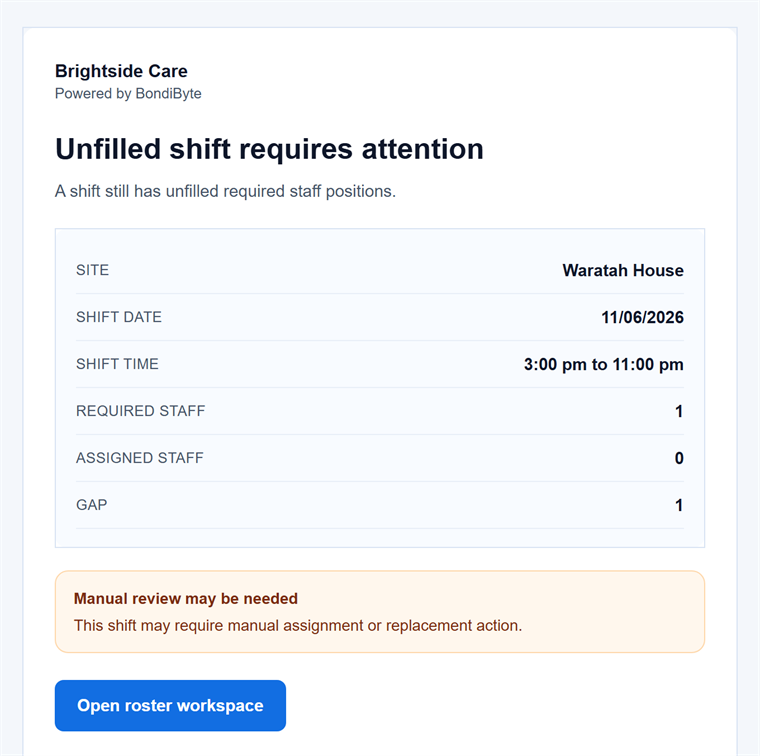
Unfilled shifts are emailed to the site manager before they become emergencies.
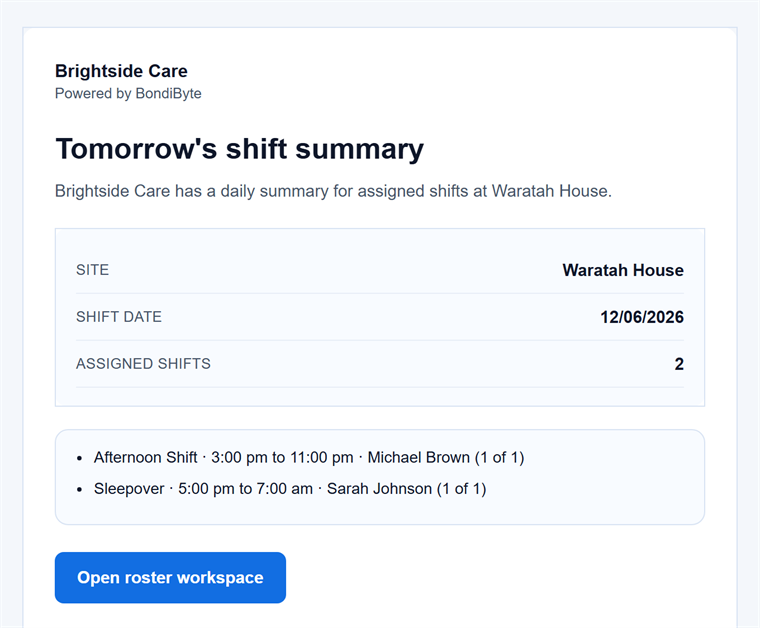
Each site can start the day with a summary of tomorrow's shifts.
An unfilled shift is only a problem if nobody notices in time, and in most organisations noticing depends on one person scanning the roster. When that person is on leave or buried, the gap is discovered the morning of the shift, and a participant's support becomes a crisis instead of a Tuesday. Coverage gaps should announce themselves.
BondiByte checks each enabled site for unfilled shifts across the next seven days, on a schedule, without anyone having to remember to look.
The manager gets an email about each upcoming gap, repeated on the reminder cadence you set rather than as a one-off that can be missed.
If a shift is within 24 hours of starting and the manager has been notified your chosen number of times, the alert escalates to your organisation admins, once, without duplicate noise.
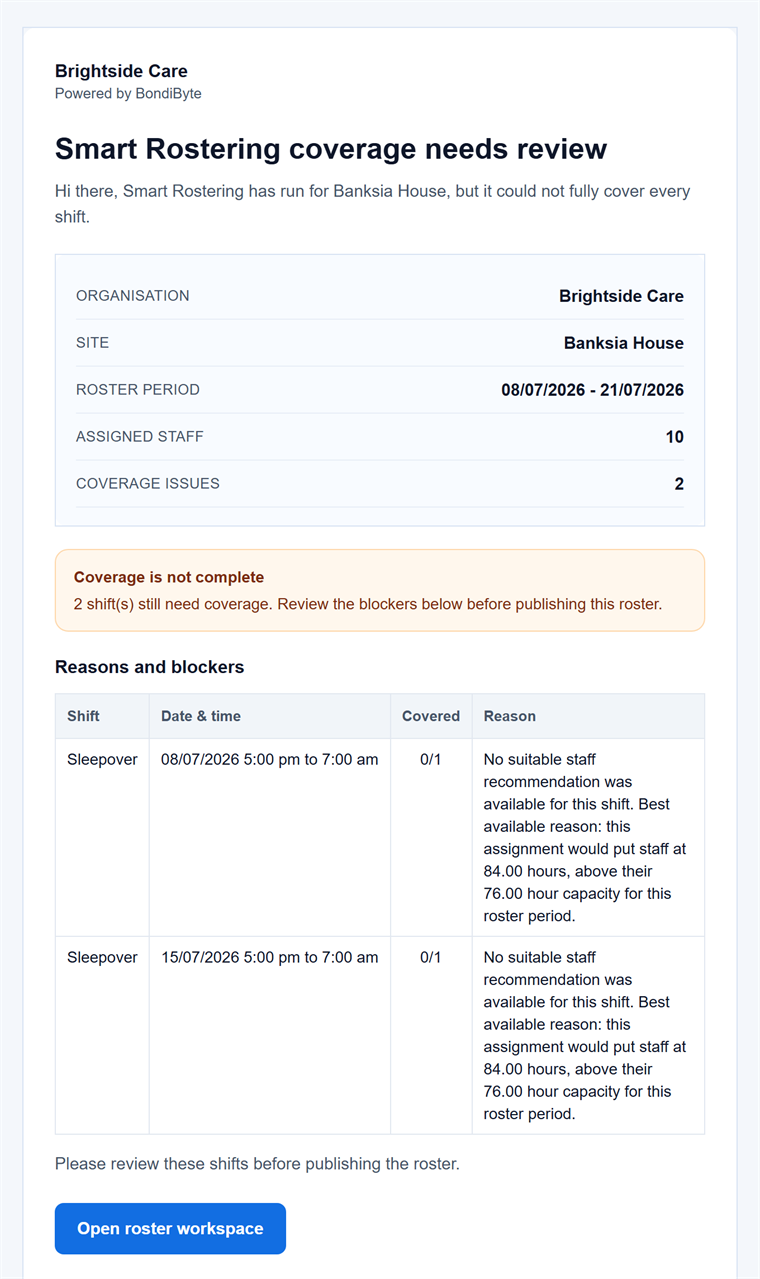
Coverage reviews show the reason a shift could not be filled, such as every linked staff member already rostered elsewhere, named with their conflicting times, or no suitable staff being available.
Each site can receive a daily email summarising tomorrow's assigned shifts at a send time you choose, so the day starts with a known picture.
Gaps in the next seven days are emailed to the site manager without anyone having to spot them on the board.
Near shift start, unresolved gaps are raised to organisation admins so a single busy inbox is never the last line of defence.
See why a shift is unfilled, including exactly which staff are busy where, so you fix the cause instead of guessing.
When Smart Rostering leaves gaps, a coverage email summarises the issues for the period so review starts in the right place.
A per-site daily email of tomorrow's assigned shifts, at the time you choose.
Every email links directly to the relevant site and period on the roster, so acting takes one click.
Unfilled-shift alerts and daily summaries are enabled site by site, so quiet sites stay quiet.
Set how many manager notices go out before an unresolved gap escalates, and how many hours pass between reminders.
Reminders respect a cooldown and escalations are sent once per shift, so urgency never turns into spam.
The site's manager gets the unfilled-shift notices. If a gap is still unresolved close to the shift, your organisation admins are brought in.
When an unfilled shift is within 24 hours of starting and the manager has already been notified the number of times you configured.
No. Reminders follow the cadence you set with a built-in cooldown, and each shift's escalation goes out once. The alerts are designed to be acted on, not filtered.
Yes. Reasons are spelled out per gap, down to which linked staff were already rostered elsewhere and when, so you can fix the roster rather than just react to it.
Seven days, checked regularly, so most gaps surface with enough time to arrange proper cover.
The full rostering cycle in one supervised workflow: patterns and periods, shift creation, suitability and hard-block checks, weighted recommendations, sleepovers, and scheduled automation.
Smart RosteringReal rosters change: someone cancels, someone wants to swap, a gap appears. BondiByte turns each change into a proper workflow: staff interest collected before assignment, open shifts claimed from the phone, cover offers when someone cancels, swaps that keep the roster true, and escalation that makes sure a gap is never discovered the morning of the shift.
Smart RosteringSet up your roster calendar once, capture how each site really runs, and let every future period start from that shape.
Smart RosteringCreate a whole period of shifts from your configured patterns and site or period settings, including recurring shifts.
Smart RosteringAsk the whole team who wants the shifts, in one step, and get answers you can actually roster from. Staff respond from their own portal, unsuitable responses are filtered out automatically, and interest flows straight into the roster suggestions.
Smart RosteringCritical conflicts are blocked before staff are even considered, then suitability signals rank who fits best.
Start your free trial, or book a demo to see it with your own operation in mind.
Hi, I can help with BondiByte features, pricing, setup and more.
Please don’t include sensitive participant or personal information.