Line items come from the agreement
The billing options offered on a shift come from the client's service agreement, filtered to the right client, site and date, so you can only attach supports the agreement actually covers.

Shifts carry client billing line items and hours so roster decisions flow straight into invoicing.
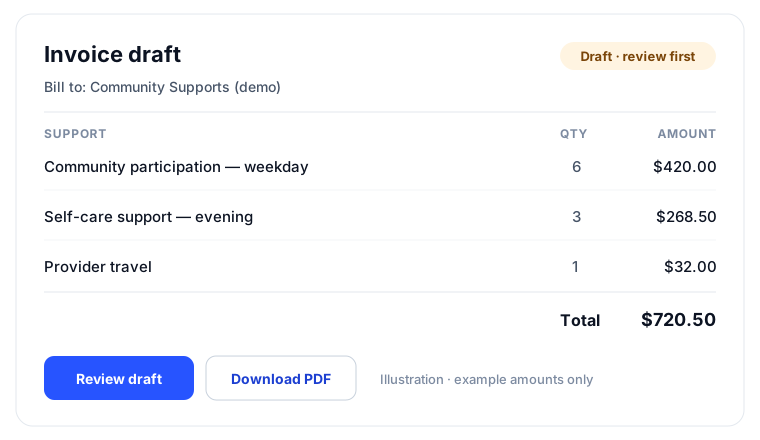
Every shift carries its NDIS line item, so what you deliver is what you bill, with no re-keying.
Billable hours and cost are set where the work happens, keeping invoices accurate by default.
Rostered support flows straight into invoice drafts and claim data, closing the loop end to end.

Shift billing line items flow into editable invoice drafts.
The gap between what was delivered and what gets invoiced is where NDIS providers lose money. When billing is reconstructed at the end of the period from memory and spreadsheets, hours go unclaimed, the wrong line items get used, and someone spends days re-keying roster data into invoices. The shift is where the truth lives, so that is where billing should start.
The billing options offered on a shift come from the client's service agreement, filtered to the right client, site and date, so you can only attach supports the agreement actually covers.
Pick the line items and hours on the shift itself, at the moment the work is planned, instead of reconstructing them weeks later.
As the roster runs, each shift carries its billing detail with it, so what was delivered and what will be billed never drift apart.
Where you enable it, draft client invoices are generated from shift billing line items after each roster period ends. Prefer manual control? Build invoices from the same shift data yourself.
Drafts stay fully editable and are never sent automatically. The automation does the assembly; you do the approving.
Billing options on a shift are drawn from the client's service agreement, so invoices always trace back to what was agreed.
Billable hours are recorded on the shift itself, so the numbers on the invoice come from the roster rather than from memory.
A single shift can carry more than one line item where the support genuinely spans them.
Billing line items attach to shifts in Light Rostering and in site-based rosters alike, including one-to-one and community clients.
Turn on end-of-period draft invoices and the roster's billing detail assembles itself into drafts, with a delay you choose so late edits land first.
Automatic draft invoices are a setting you turn on, with a configurable delay after period end. Off means fully manual, with the same shift data available.
Invoices are created as editable drafts. Sending is always a person's decision.
Because shift billing draws from service agreements you maintain, the roster can only bill supports you have actually agreed with the client.
From the client's active service agreement, filtered to the right site and date. That keeps every invoice traceable back to the agreement.
It will not feed a client invoice. If the shift should be billed, add the line items on the shift; the drafts are built from shift billing detail.
No. Automation only creates drafts. They stay editable and a person always decides when an invoice goes out.
Yes. Attach as many of the agreement's line items as the support genuinely requires.
Yes. Light Rostering shifts carry billing line items too, so simple direct scheduling still flows into invoicing.
The full rostering cycle in one supervised workflow: patterns and periods, shift creation, suitability and hard-block checks, weighted recommendations, sleepovers, and scheduled automation.
Smart RosteringReal rosters change: someone cancels, someone wants to swap, a gap appears. BondiByte turns each change into a proper workflow: staff interest collected before assignment, open shifts claimed from the phone, cover offers when someone cancels, swaps that keep the roster true, and escalation that makes sure a gap is never discovered the morning of the shift.
Smart RosteringSet up your roster calendar once, capture how each site really runs, and let every future period start from that shape.
Smart RosteringCreate a whole period of shifts from your configured patterns and site or period settings, including recurring shifts.
Smart RosteringAsk the whole team who wants the shifts, in one step, and get answers you can actually roster from. Staff respond from their own portal, unsuitable responses are filtered out automatically, and interest flows straight into the roster suggestions.
Smart RosteringCritical conflicts are blocked before staff are even considered, then suitability signals rank who fits best.
Start your free trial, or book a demo to see it with your own operation in mind.
Hi, I can help with BondiByte features, pricing, setup and more.
Please don’t include sensitive participant or personal information.