
Line items & budgets | BondiByte NDIS Software
Agreements & Billing

Funded supports as line items.

Every funded support sits on the agreement as a line item: the NDIS code, unit price, quantity and budget, entered once. Shifts, invoices and claims all draw from those same lines.

Agreement line items and budgets

What you get with Line items & budgets.

  • NDIS catalogue line items

    Build agreements from the real NDIS catalogue, so supports and codes are correct.

  • Budget amounts per item

    Set funded amounts per support, the foundation for budget tracking and claims.

  • Feeds budget burn and claims

    Line items flow into budget burn and claim data, with nothing entered twice.

Why it exists

The problem it solves.

Funded supports usually live in a plan PDF and a spreadsheet, then get retyped into the agreement, the roster and the invoice separately. Every retype is a chance for a wrong code, an out-of-date price or a mismatch between what was agreed and what gets billed. Keeping budgets honest across all of that by hand is close to impossible.

How it works

1

Pick supports from the NDIS catalogue

Add each funded support to the agreement from the NDIS catalogue in your workspace. The item code, name, unit and price come across automatically, and you can enter a custom line when something sits outside the catalogue.

2

Set quantities, budgets and dates

Give each line a quantity, a funded budget amount, optional start and end dates and notes. The agreement's supports table and budget total build themselves from the lines.

3

Prices are locked into the line

The price is captured on the line the moment you add it, so the agreement keeps saying what was agreed even after catalogue prices change.

4

The agreement goes active on its start date

When an agreement reaches its start date it automatically becomes the client's active agreement, its line items appear for shifts and Smart Rostering, and your admins are notified.

5

Delivery and billing draw from the same lines

Billing lines on shifts point back to agreement line items, and invoices generate from delivered shifts, so what you bill is always anchored to what was agreed.

What you can do.

Catalogue-backed lines

Choose from the NDIS catalogue loaded in your workspace and the code, support name, unit and price fill in for you.

Custom lines when you need them

Not everything fits a catalogue item. Add a manual line with its own code, name, unit and price, and it behaves like any other.

Budgets per line and in total

Record the funded amount for each support and watch the agreement total add itself up.

Dates and notes per line

Give individual lines their own date ranges and notes when supports start or stop at different times.

Retire lines without losing history

Deactivate a line that no longer applies and reactivate it later if needed. Nothing disappears from the record.

Feeds shifts, invoices and claims

Active agreement lines are what shift billing offers and what invoices generate from, so nothing is entered twice.

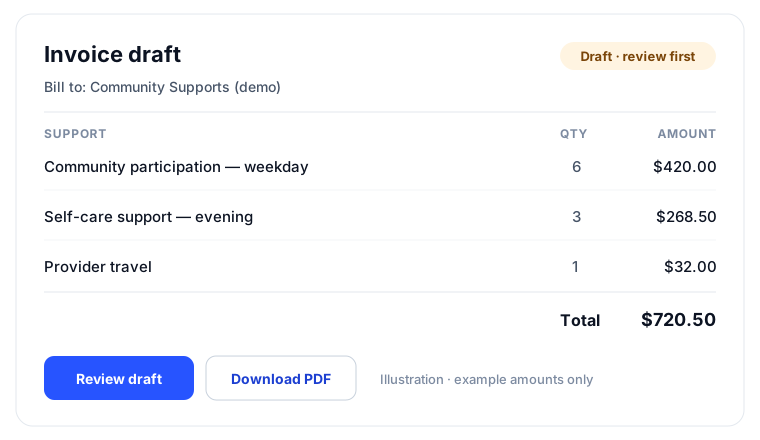
Illustration of an invoice draft listing support line items with quantities and amounts, marked as a draft to review first
Line items entered once on the agreement carry through to reviewable invoice drafts.

How it connects.

  1. NDIS catalogue
  2. Service Agreement Builder
  3. E-signature
  4. Shift billing
  5. Invoicing
  6. NDIS payment requests

You stay in control.

Signed agreements are read-only

Once an agreement is signed, its line items are locked. Changes go into a new agreement, which keeps the trail clean.

You confirm the pricing

The catalogue keeps line items consistent, but confirming supports and prices against the current NDIS Pricing Arrangements and Price Limits stays with you.

Activation is announced

When an agreement reaches its start date and goes active, admins are notified, so line items never start driving billing silently.

Learn how to use this feature.

Frequently asked questions.

Where do the prices come from?

From the NDIS catalogue loaded in your workspace. When you add a line, the price at that moment is captured on the line, and you confirm it against the current NDIS Pricing Arrangements before relying on it.

What happens when NDIS pricing changes?

Lines already on agreements keep the price that was agreed. Upload the updated catalogue and new lines pick up the new prices.

Can I add supports that are not in the catalogue?

Yes. Enter the code, name, unit and price yourself and the line works exactly like a catalogue-backed one.

Can line items change after the client signs?

No. A signed agreement is read-only, including its lines. If supports change, you set up a new agreement that reflects the change and send it for signature, and the signed original stays intact.

How do line items reach invoices?

Active agreement lines are what you attach to a client's shifts as billing lines. Invoice drafts then generate from those delivered shifts, so every invoice traces back to the agreement.

See Line items & budgets in BondiByte

Start your free trial, or book a demo to see it with your own operation in mind.

Start free trial